Build: eeaf531 | August 6 – August 11, 2026
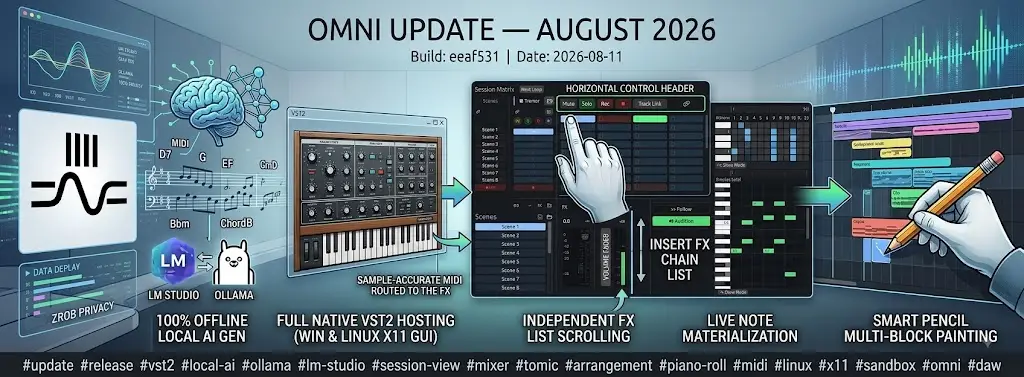
🔌 Full Native VST2 Plugin Hosting (Windows & Linux X11)
Omni now features complete, native support for VST2 (VST 2.4) audio instruments and effect plugins alongside our existing CLAP, VST3, and LV2 hosting engines:
- Complete VST2 Host Architecture — built from the ground up with custom Rust bindings implementing the full
AEffect,audioMaster, anddispatcherprotocols. Supports synth instruments, insert effects (FxType::Vst2Fx), accurate category querying (effGetPlugCategory), and safe multi-channel I/O routing. - Linux X11 GUI Hosting — on Linux systems, VST2 plugin editor windows now render natively via custom
X11UI(Xlib) window embedding, including automatic child window fixups for Windows VST2 plugins bridged through Yabridge. - Thread-Safety & Deadlock Elimination — resolved recursive lock deadlocks in
audioMasterIdlewhere GUI dispatcher calls clashed with internal plugin locks. Plugin initialization and destruction are now pinned to a dedicated, persistent GUI thread to prevent thread-lifetime issues on Windows. - Clean Asynchronous Drop & Unload Protection — closing plugin windows now performs a synchronized handshake with the GUI thread before DLL unloading, preventing race conditions and segmentation faults upon plugin removal.
- Sample-Accurate MIDI to FX — routed incoming MIDI events directly to VST2/VST3/CLAP audio effect plugins that declare MIDI handling capabilities (
effCanDo), enabling seamless use of vocoders, MIDI-triggered filters, and pitch correction plugins. - Diagnostic VST2 Probe Utility — added a standalone CLI diagnostic tool (
cargo run --example vst2_probe) for inspecting, fuzzing, and verifying misbehaving third-party VST2 binaries outside the main DAW process.
🤖 Local AI LLMs (LM Studio & Ollama) — 100% Offline & Private AI Generation
We have expanded Omni's generative composition toolset (AI Create and Smart Progression) with full support for local, offline Large Language Models:
- Native LM Studio & Ollama Dispatchers — added first-class provider integrations for LM Studio (
http://localhost:1234/v1) and Ollama (http://localhost:11434/v1) using OpenAI-compatible HTTP endpoints. - Zero API Keys, Total Privacy — run advanced generative music algorithms completely offline on your own local GPU/CPU hardware with zero cloud latency, no external subscription fees, and 100% privacy for your creative projects.
- Optimized Local Inference Timeouts — custom client timeout handling prevents premature network aborts while local models generate complex multi-measure melodies and harmonic progressions.
- Seamless AI MIDI Integration — local models hook directly into the AI Melody Generator (
ai_midi_client.rs) and Chord Progression Generator (ai_progression_client.rs), streaming quantized, musical MIDI note data straight to active clips.
🎛️ Session View Track Column & Mixer Ergonomics
The Session View mixer layout has received a comprehensive visual and functional redesign for maximum clarity and fast mixing sessions:
- Horizontal Control Header — Mute, Solo, Record Arm, Track Link, and Settings buttons are now consolidated into a sleek horizontal header strip positioned directly above clip slots instead of crowding the sides.
- Dual-Subcolumn FX & Fader Layout — the bottom section of each track column neatly splits into two parallel sub-columns: an insert FX chain list and a high-resolution volume fader.
- Independent FX List Scrolling — the FX list now scrolls smoothly within a capped height boundary, preventing tracks with long plugin chains from distorting the vertical grid alignment of the entire mixer.
- Full-Width Return Bus Sends — auxiliary send knobs have moved out of the narrow fader column into their own dedicated row across the full track width, featuring smooth horizontal scrolling when projects exceed 3 return buses.
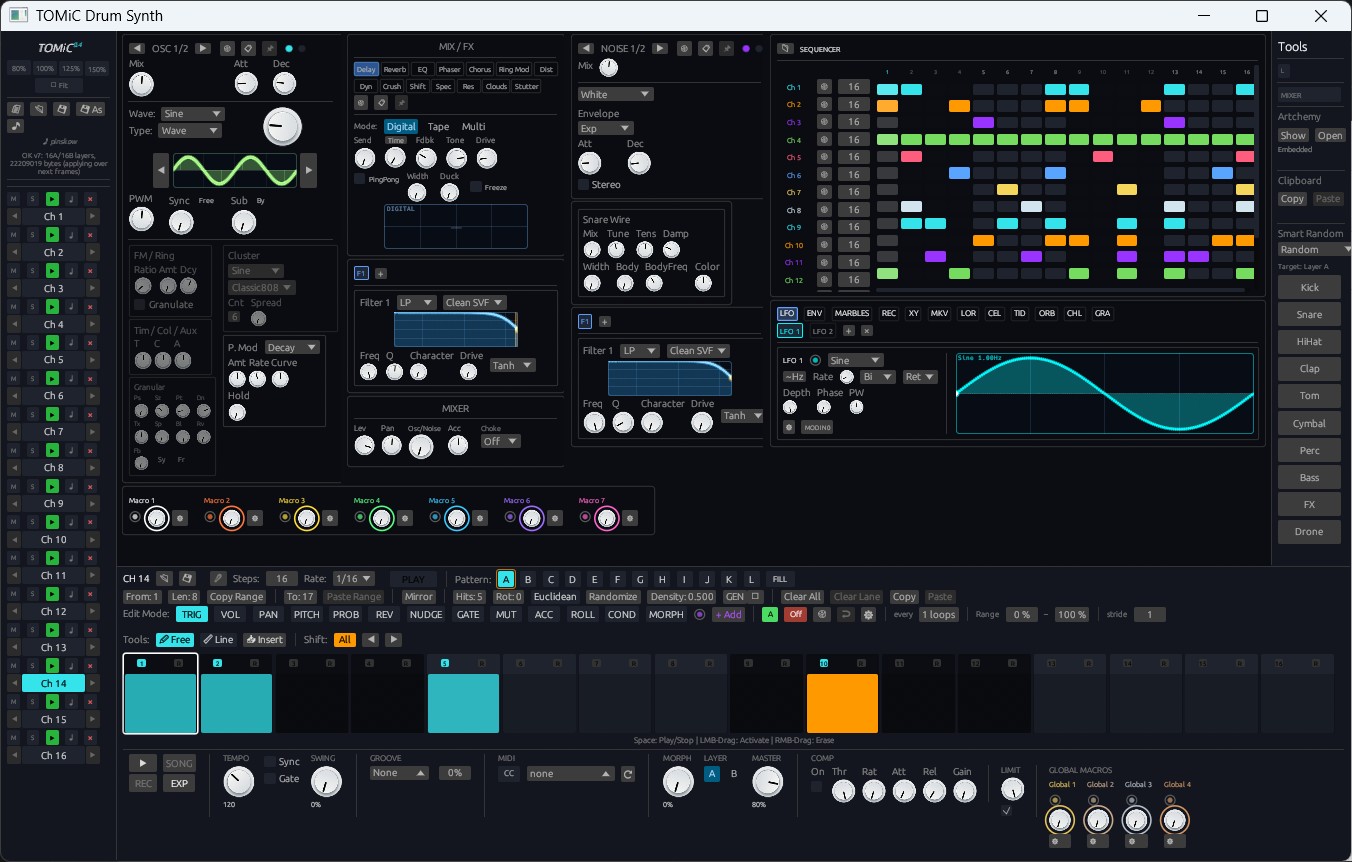
🥁 Tomic Drum Synth & Sequencer Engine Overhaul
We conducted a deep timing precision and DSP audit of the Tomic percussion synthesizer and step sequencer:
- Sample-Accurate Buffer Boundary Clocking — fixed a critical step detection issue where edge transitions across audio buffer boundaries were skipped, causing tempo drift, ghost resyncs, and doubled trigger hits (e.g., kick or snare firing twice at the start of loop cycles). Step indices are now persistently tracked across callbacks and anchored directly to the host transport clock.
- Audio Thread Allocation Removal (RT Safety) — eliminated per-step heap clones (
self.pattern.clone()) on the audio callback, ensuring zero-allocation real-time safety. - Live Note Materialization (
pattern_to_midi_notes) — active Tomic step patterns are now immediately materialized as standard MIDINoteobjects in clip memory across both engine and host. Patterns programmed in the Tomic step editor appear instantly inside the Piano Roll and Pencil editor without manual conversion. - Arrangement Recording Support — Auto-mode Tomic tracks now record cleanly into the Arrangement timeline as fully editable MIDI clips rather than silent placeholders.
✏️ Arrangement Workflow: Smart Pencil Multi-Block Painting & Tool Isolation
Arrangement editing has been refined to match the speed and fluid feel of industry-standard production workflows:
- Smart Pencil Painting — painting with the Pencil tool now dynamically adopts the exact duration of the source Session clip (or sampler region) rather than a rigid 1-bar block. Dragging across the timeline continuously paints sequential blocks one after another, stopping automatically upon colliding with existing clips, and grouping the entire gesture into a single undo operation.
- Expanded Edge Hit-Testing — widened hit-test grip zones on clip boundaries, eliminating misclicks between resizing/looping clip ends and drawing new blocks.
- Hybrid Clip Slicing (Scissors Tool) — fixed
ArrangementClip::split_atfor hybrid sampler+MIDI clips (Gate, Slice, Granular modes), preserving all internal MIDI notes across split boundaries. - Editor Shortcut Isolation — keyboard shortcuts (Delete, Backspace, Ctrl+A, Ctrl+C, Ctrl+V, Ctrl+D, Ctrl+Z) are now strictly isolated between the Piano Roll and Arrangement view, preventing accidental background clip deletions while editing notes.
🎹 Piano Roll Workspace & Viewport Optimization
- Consolidated Top Controls — separate-window detachment, MIDI Import/Export, and clip tabs have been unified into a single streamlined row within the right generator panel.
- Unified Left Tool Rail — standardized tool switching across all 4 sequencer modes with a clear 2x4 tool/mode matrix in the Piano Roll.
- Maximized Note Canvas — the bottom Mode/Velocity/Chance panel now collapses by default into a "Show Mode" toggle, giving immediate priority to a larger visible note matrix upon opening.
- Context-Aware Expression Lanes — expression lanes automatically hide when editing Step Sequencer, Euclidean, or Drum Machine clips (where per-note expressions do not apply), reclaiming 100px of vertical workspace.
🛡️ Sandbox Process Hardening & MIDI Settings Persistence
- CLAP Multi-Plugin Bundle Identification — fixed sub-plugin identifier parsing (
::clap_id) in the sandbox process, resolvingos error 126when loading multi-plugin CLAP bundles. - Unified DLL Search Path — standardized plugin loading with
LOAD_LIBRARY_SEARCH_DLL_LOAD_DIRacross VST2, VST3, and CLAP, allowing plugins with private sibling DLL dependencies to load reliably. - Silent Sandbox Initialization — configured the sandbox worker process with
windows_subsystem = "windows", preventing unwanted console windows from flashing on startup. - Default MIDI Controller Persistence — the MIDI IN device dialog now includes a "Save as default" option (stored in
midi_settings.json), automatically reconnecting your preferred hardware controller whenever Omni starts.
Over the past week, Omni has expanded its plugin architecture with native VST2 hosting on Windows and Linux, brought fully private Local AI music generation, rebuilt the Session mixer layout, and perfected timing across the Tomic drum engine and Arrangement tools. Update to build eeaf531 today and elevate your production workflow! 🚀