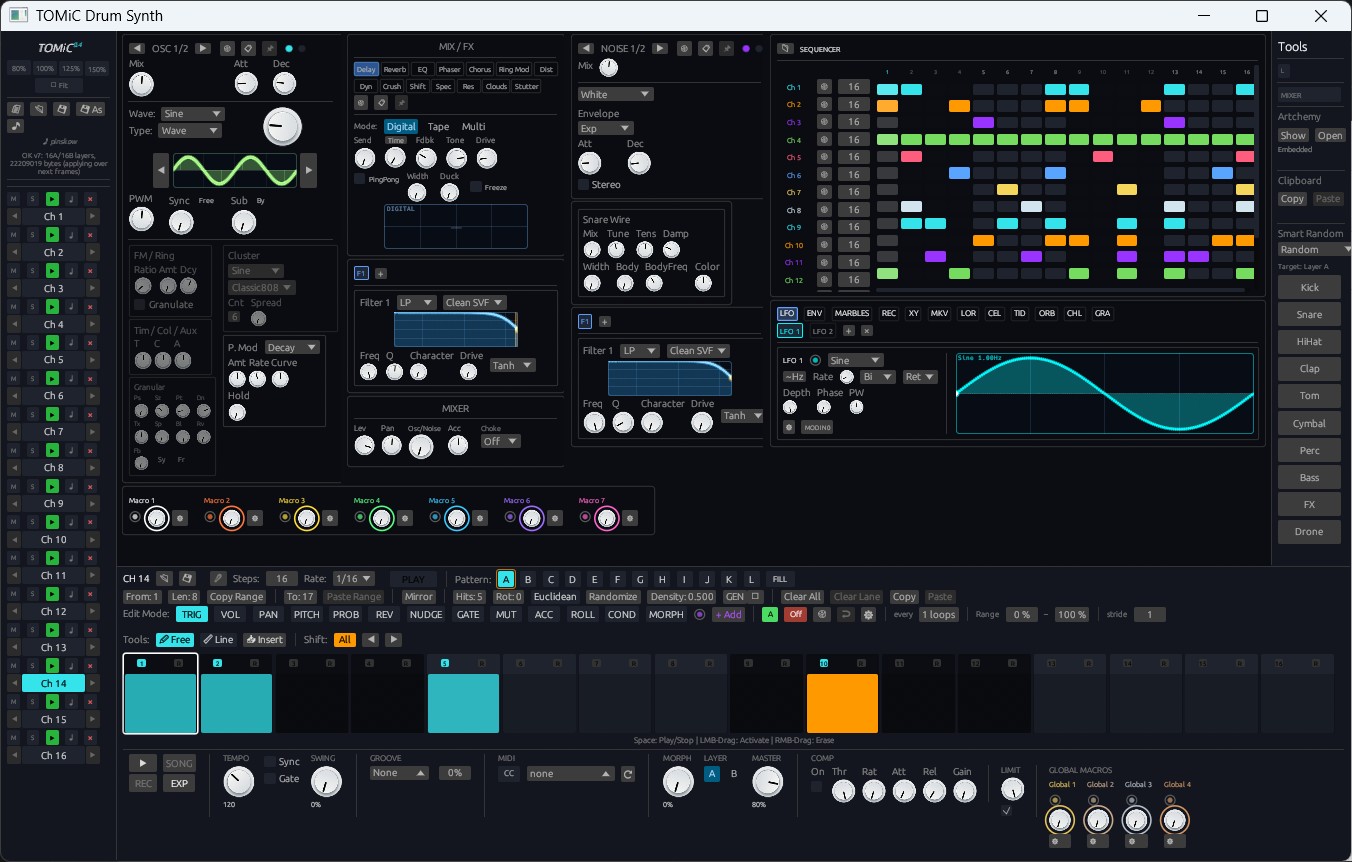
Build: 93a648de (last commit in this update: Link ALL: relative knob ganging across every enabled channel).
The previous update gave TOMiC 0.6 a physical-modeling plate, a kit-level groove generator and a modular chain editor. This one is about workflow at the speed of ideas: dropping a break onto a channel and having it play back as steps, ratchets that turn into tones, grooves stolen from real recordings, a drummer's body deciding what is playable, one click that builds the B…L variations and the fill, sounds that evolve by selection instead of by knob-turning, and — in standalone — a real two-deck live set with a seamless engine handoff.
Here is everything new in this TOMiC 0.6 update:
🥁 1. Slice Beat — A Drum Loop onto the Channel's Steps
The Sample Manager gains a Slice Beat button that turns any drum loop into a sequence, the way hardware slicers do:
- Geist-Style Analysis: SuperFlux-style log-filtered per-band spectral-flux onset detection finds every hit; each is classified as Kick / Snare / Hat / Perc from band energies, centroid, flatness and decay; tempo comes from onset autocorrelation snapped to whole bars, a BPM tag in the file name, and a backbeat cue; swing is measured from the off-beat hits.
- The Channel Is Rewritten to Play the Loop: one slice per hit, on the hit's step, with the original micro-timing carried in the NUDGE lane — every hit fires within 3 ms of its position in the original loop, and the result is a pattern you can vary, re-order, ratchet or randomize like any other.
- Always 16ths, at Most 64 Steps: a long loop is sliced one Start/Stop window at a time — a fresh loop auto-fits its first four bars, and the report row's Window: bars a–b of N pages through the rest. Short loops are never truncated; an octave-high tempo estimate is corrected against the loop length.
- Report Row & Re-Slice: detected BPM, bars and class counts, a Bars override, a BPM field, Quantize %, Set tempo / Swing toggles and Re-slice; slice regions in the waveform are tinted by class, and a right-click re-classifies any region (Drum: Kick / Snare / Hat / Perc) with overrides that survive a re-slice.
- Split to Kit: kicks, snares, hats and percussion each get their own channel, named after the drum, each playing only its slices — a single break becomes a four-piece kit you can mix, effect and re-sequence per instrument.
- Plays Dry, Plays Clean: the voice's FX section is reset to defaults, Auto-Randomize is switched off, and Hat Mode / choke settings that would punch holes in a loop are cleared — one undo entry for the whole gesture.
- Shift + Drop: hold Shift while dropping a loop from the sample browser onto a NOISE panel to load and slice in one gesture.
Alongside it: a 🗑 trash button in the Noise panel finally empties a variant's sample slot (thumbnail, path, embedded copy, engine buffer and slice markers, one undo entry), and entering Sample mode now asks — Clear FX / Keep FX — instead of silently keeping the previous patch's delay and distortion on your sample (a sample blended through the patch's FX is a legitimate design, so nothing is cleared without asking).
⚡ 2. Retrig — Ratchets up to Audio Rate
The ROLL popup gets a second Mode: Retrig. Instead of a counted roll, the voice re-strikes its own sound source at a rate in Hz:
- Rate 10–700 Hz, Ramp ±4 Octaves, Length in Steps: below ~30 Hz it is a fast machine-gun roll; above, the hits fuse into a pitched buzz and the sequencer effectively becomes an oscillator. Ramp sweeps the rate over the episode; Len is measured in the channel's own step.
- Only the Sound Source Restarts: amplitude/pitch/FM envelopes, oscillator phases, noise models, the click and the Mesh strike. Filters, FX, modulators, the compressor and hosted plugins keep running across hits exactly as they do across one long note — resonant filters ring, delays don't freeze, and the note-on path is never flooded with hundreds of events per second.
- Pitch and Velocity Shapes Still Apply: Up/Down spread the semitone amount over the whole episode, Alt/Random act per hit. Step cells show RT in magenta; Retrig lives inside the step's Roll Style so copy/paste, right-click clear and Auto-Randomize carry it along.
⚡ 3. FX Lane — Per-Step FX Bypass on Its Own Clock
A new ⚡ FX step lane lets each step decide which of the channel's effects skip the hits fired while it is current — with its own polymetric clock like SLICE and VAR:
- One Button per Unit: Delay, Reverb, EQ, Phaser, Chorus, Ring Mod, Distortion, Wavefolder, Widener, Compressor, Transient, Bitcrusher, Freq Shifter, Spectral, Res, Clouds, Beat Repeat and the hosted CLAP A/B and Omni A/B slots. An empty mask means everything plays — which is what every earlier save loads as.
- Tails Keep Ringing: delays, reverbs, Clouds, Beat Repeat and hosted plugins are fed silence while bypassed rather than muted, so the previous hit's echo keeps ringing while the bypassed hit passes dry. Pure inserts are skipped outright.
- RND and Auto-Randomize Aware: the RND flag keeps each skipped unit skipped by a coin flip per hit (randomness can only let an FX back in); Auto-Randomize reshuffles the lane's palette and hands back any unit that would otherwise vanish, so repeated rerolls never erode the lane.
- Fixed Along the Way: the VAR lane's Auto-Randomize had never actually run since it shipped — the engine's two AR gates didn't list it, so switching VAR's AR on did nothing. Both gates now include VAR and FX, and VAR rerolls are flushed into the display buffer.
🎼 4. Groove Extract & Groove Pool — User Grooves from Your Own Loops
The built-in templates move steps by fixed, hand-written amounts. Groove Extract takes the timing from a real recording:
- From a Loop or a MIDI File: drop a WAV/FLAC/MP3 break — or a
.midfile — onto the GROOVE tile in the transport bar, press Extract from file… in the new Groove Pool window, or press Groove on a sample already loaded on a channel. TOMiC measures, for every 1/16 position in the bar, how far ahead of or behind the grid it plays and how loud it is. - Timing + Velocity: a user groove carries a signed timing offset up to ±½ step and a 0..1 velocity profile per position, over 1–4 bars. A new vel field next to Amount sets how much of the recording's dynamics to apply — the loop's ghost notes become ghost notes in your pattern.
- Analysis Options: Bars (1–4), Anchor (Median to grid keeps the groove faithful; Earliest to grid shifts it late so every offset is audible), Class (take the feel from the hats only, say), Smooth (rejects stray hits), BPM override and onset sensitivity with re-analysis, all previewed live as TIMING and VEL bars.
- A Real Editor: drag the bars, normalize velocity, zero timing, rebase, duplicate, rename; copy any built-in template into an editable user groove; save grooves as
.tomic-groovefiles inDocuments/Tomic/Groovesto carry them between songs. - The pool is song state — saved in the DAW session and the
.tomicfile, cleared by New Song, fully undoable. MIDI files appear in the sample browser as drag sources for GROOVE.
🥁 5. Drummer Model — A Limb-Aware Humanizer (DRUMMER Tab)
Instead of a random "humanize" jitter, the new DRUMMER tab of the SEQUENCER tile treats the kit as a body with two hands and two feet:
- Sticking: every hit is allocated to a limb per step — fast runs alternate hands, the non-dominant hand plays softer and a few milliseconds late, a limb that has to travel far across the kit arrives late, and long, dense playing wears a limb down (velocity sags, timing scatters). Timing is always late, never early — like a body.
- Human / Machine, Fatigue, Lefty: one knob scales every effect (at Machine the pattern is bit-exact as drawn); Fatigue sets how fast limbs tire; Lefty makes the left hand lead. Every channel gets a limb setting — Auto (from its archetype), Off (bass, FX, drones), Right/Left Hand, Either Hand, Right/Left Foot.
- Unplayable Cells: the tab simulates the pattern and prints the sticking of every hit; cells the allotted limb cannot reach in time get a red dot — also shown in the step matrix while the model is engaged.
- Make Playable & Bake: Make playable moves or removes the flagged hits and tells you what it did (Ctrl+Z to undo). Bake writes the model's velocity sags and late offsets permanently into the VOL and NUDGE lanes and sets the live model to Machine so nothing is applied twice.
- One core serves both the audio thread (a post-pass shared by live playback and offline export) and the editor's report — what the tab shows is what you hear.
🏗️ 6. Pattern Architect — Variations into B…L & the Fill Architect (ARCHITECT Tab)
Generators make loops; the Pattern Architect makes transitions:
- 7 Role-Aware Variation Kinds: Subtle, Variation, Build, Breakdown, HalfTime, Strip and Shift, each reading roles from the channels' archetypes and names — so a kick, a snare, an open hat and a tonal voice are treated as what they are. Pick a source, a target, a kind and an Amount, or Build all to fill every slot from a per-slot ladder (kind · amount) recipe.
- Fill Architect: Roll, Break, Stutter or Silence written into the FILL slot with an Intensity, plus options — crash at start, kick drop-out, tom ramp, turnaround twist, a filter sweep drawn as a param lane, an FX tail that bypasses delay and reverb through the fill (via the new FX lane) and brings them back on the last step so the 1 lands wet.
- New Trig Condition — AfterFill (AFT): fires only during the first cycle after FILL is released. The Fill Architect's Landing crash uses it to write an AFT-conditioned cymbal on the downbeat of the source pattern — the crash lands exactly once, right after the fill.
- Shortcuts: Shift + right-click a pattern letter → Variation of X; right-click FILL → build the fill. Per-channel locks, a lockable seed, and one undo step per build.
🧬 7. Breed — Genetic Sound Design (BREED Tab)
The SEQUENCER tile's new Breed tab breeds sounds instead of drawing them — you say which candidate you like, TOMiC works out which knobs that implies:
- Two Parents, Six Children per Generation: Parent A is the channel you are editing; Parent B is optional — another channel, the other layer, a
.tomic-drumpreset, or none (mutations only). A child inherits each section of the sound (OSC, NOISE, filter, each FX unit, each modulator, mix) whole from one parent, so the topology is never a mosaic of incompatible halves; where both parents share a section's topology, knobs are blended (log-scaled for Hz and ms) so children land between the parents. A mut slider nudges knobs within each parameter's real range; enums never mutate. - Audition by Applying: click a child to hear it in the running sequencer through the channel's own FX and mixer — every apply is an undo step, and A: restores the sound you started from. A tooltip lists the biggest differences to Parent A; a colored bar shows which parent each section came from.
- Hearts, Generations & a Shelf: ♥ a child to make it a parent of the next generation and keep it on the Shelf — your library of bred sounds, saved with the project and left alone by New Song (up to 64 entries; right-click to send to any channel, use as Parent B, save as a preset, or remove). ◀ ▶ step through generations.
- Bred sounds never touch a channel's wiring — choke group, sidechain source, macro mappings, sample slots and hosted plugins stay put. Breed works in the plugin as well as in Standalone.
🎚️ 8. Live Set — Setlist, Deck B & Bar-Quantized Crossfade (Standalone)
The standalone app gains a SETLIST tab that turns it into a two-deck performance rig:
- Deck B on Its Own Real-Time Thread: a second headless engine plays the next
.tomicsong while the current one keeps running, rendering one block ahead so the main audio callback never waits on it. Cue builds a deck off the GUI thread; Auto-cue next keeps the set rolling hands-off. - GO, Quantized to the Bar: the transition starts on Deck A's next bar (or now), with an equal-power crossfade of 1–32 bars or a manual crossfader you can drag — or drive from a controller via two new MIDI Learn targets, Live Set Crossfader and Live Set Go. Cancel fades back to Deck A over one bar.
- Sync Tempo: Deck B starts at Deck A's tempo and glides log-linearly to its own over two bars once the fade is done.
- Seamless Engine-Swap Handoff: when the fade completes, the engines are swapped at a block boundary — sequencer position, every voice tail and every FX state travel with it — the new song is loaded into the host parameters so the GUI knobs match, and playback continues without a seam. Deck B does not host CLAP/Omniplugin instruments; they are restored right after the handoff.
- DSP Load & Underrun Meters: audio-callback time as a fraction of the block's budget, and a counter of blocks Deck B did not deliver in time — a gap in Deck B only, never in Deck A. Setlists save as
.tomicsetfiles. - Two follow-up fixes shipped the same weekend: Stop works again after a handoff (the deck engine no longer carries the offline renderer's force sequencer run flag), and a cued song can no longer be re-cued in the block or two before the audio thread adopts it.
🔗 9. Link ALL — Relative Knob Ganging Across Every Channel
A chain-link toggle in OSC 1's Mix Mode row gangs every channel while it is on: dragging any knob of the selected channel — OSC, Noise, filter, every FX unit, the compressor, modulators, and the mixer's fader and mini knobs — moves the same knob on every enabled channel by the same relative amount. The delta is measured from the gesture's start, so nothing drifts on a long drag and a sibling pinned at 0 or 1 comes back the moment you reverse. Double-click resets each sibling to its own default, a typed-in value is copied, the R random gesture stays per knob, and effect enables (Clouds, Beat Repeat, filter slots) copy the bool. One ganged gesture is one undo step; hosted-plugin knob banks and the Master bus are never ganged.
🖥️ 10. UI: The Mixer Fills the Panel, Real Fonts & Icons, Readable Lanes
- Mixer Fills the Central Panel: the console used to sit at a fixed 84 pt per strip in ~1235×640 pt of space, so everything read as shrunk. It now lays itself out from the space it actually has — eight strips plus the master span the width, every element scales with the strip up to 2×, and the fader stretches to the panel's height. A ninth enabled channel keeps the eight-strip width and scrolls instead of squeezing the others.
- Exo 2 / JetBrains Mono / Phosphor: every UI glyph now goes through a semantic icon set backed by Phosphor, with Exo 2 for text and JetBrains Mono for read-outs — bundled, so nothing depends on system fonts. The "square" glyphs some users saw were characters absent from the bundled font family; they are gone. Exo 2 is metric-patched so rows stay pixel-identical to the previous layout.
- PITCH Lane: note names in a monospace label sized to the cell on their own dark backing, a one-degree-tall block marker instead of a hairline, guide lines painted under the label with every C marked, and flats in minor-flavoured scales — readable even on 64-step grids.
- SLICE Lane Dial Cell: past 8 slice regions the unreadable per-step ladder becomes a dial — one big class-tinted slice number, a position gauge, relative drag, scroll ±1, and a click that opens a picker with the sample overview and one button per slice.
- Transport Bar: the Global Macros column now aligns with the COMP block.
🔁 11. Stutter Locked to the Sequencer Clock
The Beat Repeat scheduler used to free-run — Interval and Offset counted samples from whenever the effect was switched on, so the repeat phase differed after every Play and every on/off toggle. Now Interval, Offset and Grid count from the sequence's step 0, so the phase is identical after every Play, every toggle and every host loop wrap; the Repeat latch is quantized to the next Grid line while playing. A new Capture mode — Ahead (default: loops the slice that played on the beat, so the first line after enabling already fires) or Behind (the classic retro-capture) — and a click-free switch-off (wet slews out, dry crossfades in, the tail is kept alive until it settles) round it off. The hosted master chain now receives the correct chunk-start transport position as well.
🥏 12. Mesh 2D: Chladni Fixed & Every Plate Tuned to Its Real Lowest Mode
- Chladni Was Islands: the Chladni geometry cut its holes along the nodal lines of the interference field — continuous curves across the disc — so every seed shredded the plate into 10–18 isolated islands: some seeds went silent, level varied 30× between seeds, the fundamental came out ~2.5 octaves sharp and the ring died in under half a second. Chladni is now a disc pinned on the antinodes of a seeded plane-wave field (8 % of the area) with a pin-free core, and the strike point and pickups snap to solid material.
- Per-Geometry Tuning: the tuner assumed a full pinned square for every shape, which put every rimmed disc 3–4 semitones sharp. A new allocation-free eigen-solver finds the built mask's real lowest mode on structural changes only; rim-only changes are scaled analytically and no longer clear a ringing grid — an LFO on Rim no longer wipes the previous hit at every strike.
🛡️ 13. Stability & Under the Hood
- REAPER Stack Overflow on the Groove Dice: pattern publishing now copies element-wise into the triple buffer instead of building a full pattern set on a small host thread; a stress test covers every groove style/sound/tune/poly/seed combination. State-save logging and a
reaper_diagscript help diagnose host issues. - VAR Lane Merge Gap: the VAR lane's clock and Auto-Rand config were never merged from the GUI after startup, so switching VAR randomisation off did nothing until a full reload — fixed.
- Deterministic Engine Benchmarks: the DSP benches used a random Smart Random kit as their baseline, so an apparent +10 % engine regression turned out to be a bench artifact; they now build on a deterministic default kit.
- Font Glyph Guard: a unit test scans every UI string for characters the bundled fonts cannot draw, so square glyphs cannot come back.
📚 Manual Updated
The TOMiC User Manual (EN / PL) has been updated for everything above: Slice Beat and the sample-mode FX prompt (3.3), the sequencer tile's tabs, Retrig, the FX lane, AfterFill, Groove Extract, the Drummer Model, the Pattern Architect and Live Set (Chapter 6), Link ALL and Breed (Chapter 7), the sequencer-locked Stutter (5.14), the Chladni geometry (2.10), and a new mouse-gesture table in the reference chapter.
🚀 Get the Latest TOMiC 0.6 Update
The latest TOMiC 0.6 update is available now for all users.
To update, simply download the latest installer and install it over your existing version. All your presets, sample libraries, and settings will remain completely intact. Live Set is part of the Standalone build; everything else is available in the VST3 and CLAP plugins as well.
- Standard Windows / Linux Installers: Download the latest 0.6.0 build from your user dashboard.
- Legacy CPU Build: If you are running an older processor without AVX2 instructions, download the dedicated compatibility build (
TomicDrumSynth-Setup-0.6.0-compat.exe).
Explore the updated capabilities on the TOMiC Product Page or get your license at the Purchase Portal!