Build: 6320532 | November 1 – November 3, 2026
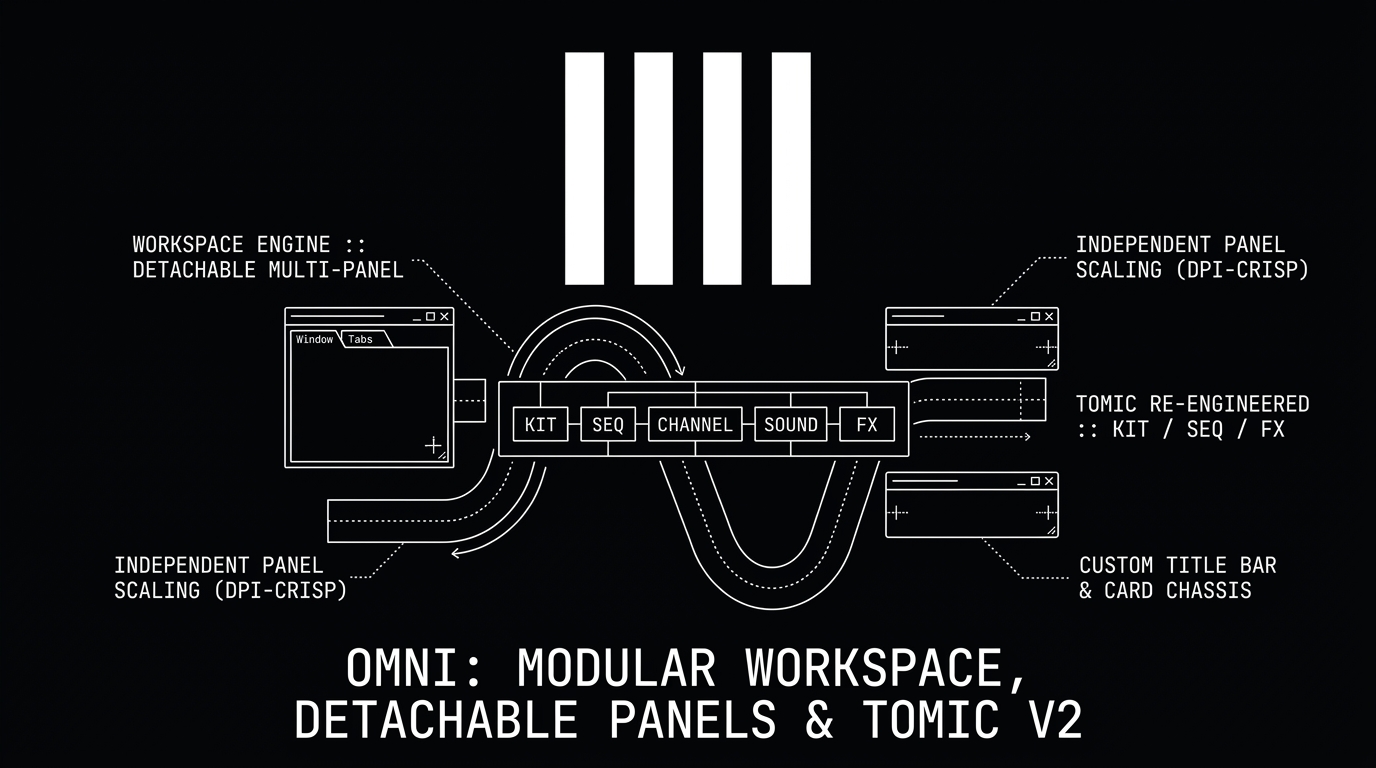
Only days after introducing the expansive 20+ audio effect suite and Iris 2, Omni has reached a defining milestone in its user experience and architectural design. Over the past 48 hours, twenty-five commits have completely overhauled the workstation's interface into a fully modular, multi-monitor workspace system, alongside a comprehensive re-engineering of the TOMiC drum synthesizer.
From independent per-panel DPI scaling and floating effect windows to saved workspace layouts, a custom frameless title bar, and card-based visual design, Build 6320532 delivers the most customizable and distraction-free studio workflow in Omni's history.
Here is an in-depth breakdown of what has arrived!
🪟 The Modular Workspace Engine: Detachable Panels & Multi-Monitor Freedom
Every studio setup is unique — whether you produce on an ultra-wide curved display, a multi-monitor desktop rig, or a compact laptop on the road. Omni now adapts to your physical space with complete fluidity:
1. Universal Panel Detaching
Every primary section of Omni can now be popped out of the main window into its own native floating window:
- Detachable Surfaces: Arrangement Timeline, Session View matrix, Piano Roll & Drum Track Editor, Sample Waveform Editor, Device & FX Rack, File Browser, Return Buses, Master Strip, Master Console, and Perform View.
- Instant Pop-Out: Click the pop-out icon in any panel's header bar or press
Ctrl+Alt+Oover the active panel. Closing a floating window seamlessly docks it back into the master workspace.
2. Individual Floating FX & MIDI FX Windows
- Isolate Any Device: Any audio effect, MIDI effect, or third-party plugin in an insert chain can now be opened in its own dedicated floating window.
- Smart Rack Spine: Detached devices leave a slim placeholder spine in the rack chain — clicking the spine instantly re-docks the device.
- Independent Window Zoom: Size and scale individual plugin GUIs to fill secondary displays without affecting adjacent devices in the rack.
3. Independent DPI-Crisp Panel Scaling
Unlike standard DAWs that scale everything uniformly or blur UI elements when enlarged, Omni introduces true per-panel vector scaling:
- Independent Zoom Factors: Run the Arrangement at 100%, enlarge the Piano Roll to 125% for high-precision note editing, and scale a complex synth GUI to 150% on a 4K display.
- Zero Blur (Physical Pixel Density): Scaling transforms native egui render layers with recalculated font metrics (
ppp × scale), guaranteeing pin-sharp typography, ultra-clean vector lines, and crisp knobs at any zoom level. - Dedicated Zoom Card: Every panel features scale preset pills, reset to 100%, and mouse-wheel zoom via
Ctrl+Alt +/−/0.
4. Saved Workspace Layouts (.omnilayout)
- Transport Bar Workspace Hub: Access the new Workspace menu directly from the top transport bar to switch between curated multi-screen layouts.
- Save & Restore: Save your current multi-monitor window arrangement, panel zoom scales, and drawer states under named presets or export them as portable
.omnilayoutfiles. - Reopen on Startup: Check "Reopen windows at startup" to have Omni automatically reconstruct your multi-window layout the moment you launch the DAW.
🎨 VS Code-Style Visual Architecture & Custom Title Bar
Omni's aesthetic has evolved into a modern, unified digital instrument inspired by the clean precision of developer environments:
- Custom Frameless Title Bar: Replaced bulky operating system window frames with a sleek, dark header bar featuring the crisp official OMNI brand mark, global application menus (File, Edit, View, Options, Help), a centered project name display, and native-feeling window control buttons.
- Card-Based Panel Anatomy: Panels are now treated as distinct visual cards separated by subtle micro-gaps, refined border outlines, and smooth rounded corners. Resizable borders feature tactile three-dot drag handles (
...). - Harmonized Instrument Hardware Chassis: Built-in instruments (Alchemy, Omni Synth, Scratch Deck, Iris 2, TOMiC) now share the exact same hardware chassis styling as insert effects, complete with a dark title header, modulator drawer access, scaling controls, and pop-out window buttons.
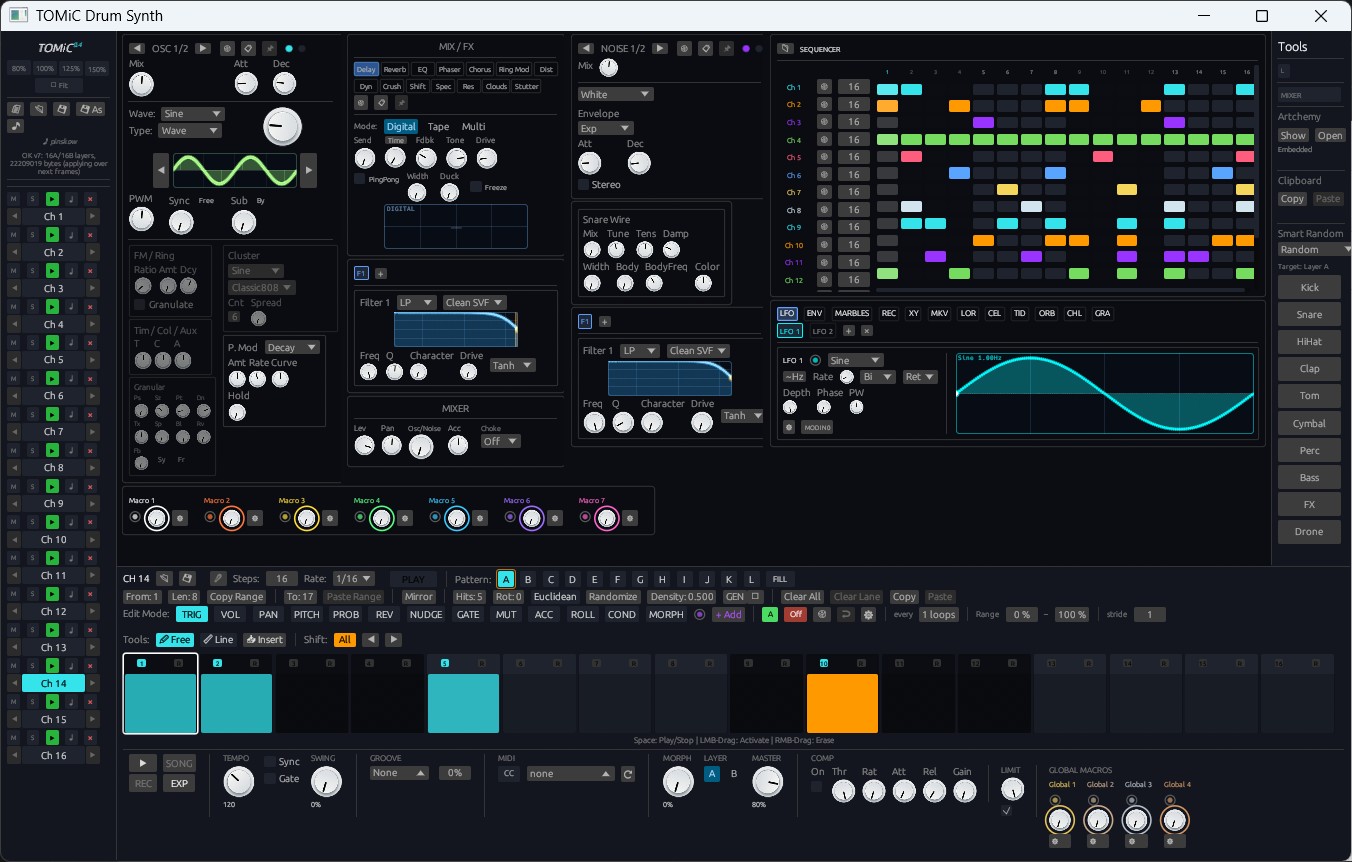
🥁 TOMiC Drum Synth Re-engineered: Ergonomics, Generative Engines & Multi-Out
The TOMiC drum synthesizer has undergone a massive structural overhaul to fit harmoniously into the new device ecosystem:
1. Standard Rack Ergonomics & 5 Modular Views
TOMiC has been re-architected to conform to the standard DAW device dock height, eliminating awkward vertical jumps when navigating through device chains. It now organizes its vast feature set across five streamlined tabs:
KIT: Drum kit browser, master kit parameters, and interactive pad triggers.SEQ: Polyrhythmic step sequencer with per-channel parameter lanes.CHANNEL: Individual channel mixer with level, pan, pitch, decay, and mute/solo.SOUND: Deep drum synthesis engines with tactile rotary dials for all parameters.FX: Insert processing and master kit saturation.
2. Generative Rhythm & Sound Engines
- Algorithmic Rhythm Generation: Generate fresh Euclidean, syncopated, and polyrhythmic drum grooves on the fly across individual channels or the entire kit.
- Dynamic 4-Channel View: Kits now initialize with a focused, highly legible 4-channel view that dynamically expands as additional drum voices are introduced.
- Rotary Dial Sound Selectors: Synthesis model selectors have been replaced by tactile rotary knobs with full CV and LFO modulation support, allowing dynamic modulation of drum engine algorithms in real time.
3. Automated Multi-Out Track Grouping
- Instant Kit Group Creation: Clicking
+ TRACKon any TOMiC channel automatically breaks out its audio into an independent mixer track. - Collapsible
<Kit Name> KitGroup: TOMiC and all created channel output tracks are automatically bundled together into a clean, collapsible track group with pre-configured FX Rack inserts for immediate parallel processing.
📐 Smart Viewport Geometry: The Zero-Squish Scaling System
A common frustration in digital workstations is UI compression — where opening a rack or zooming in squashes timeline tracks or mixer faders. Omni introduces a responsive layout solver that completely eliminates this issue:
- Non-Destructive Dock Expansion: Scaling up the Device dock (or increasing global UI zoom with
Ctrl +) no longer squashes the Session View matrix, Master strip, or Return buses. Tracks strictly maintain their 100% design height while gaining smooth, synchronized vertical scrolling. - Sample Editor Infinite Canvas: Detaching or zooming into the sample editor maintains the waveform's true horizontal aspect ratio, providing fluid side-scrolling via themed 3 px graphite scrollbars instead of compressing the wave.
- Upward Clip Editor Expansion: Expanding the bottom clip editor grows upward over mixer strips with priority scrolling, keeping critical controls accessible.
⚡ Workflow Refinements & Polish
- Fast Group Collapse (
Alt+G): Instantly collapse or expand any track group by pressingAlt+Gor right-clicking from any member track. Active groups are demarcated by a sleek, luminous hierarchy frame. - Vibrant MIDI Track Identity: New MIDI tracks automatically initialize with the title
MIDI Nand feature crisp emerald green keycap badges, providing high-contrast visual separation from blue audio tracks. - Auto-Focus on Device Creation: Adding a built-in synth, audio effect, MIDI effect, or modulator automatically focuses and centers the rack view directly onto the newly inserted device.
- Accurate Offline Export: Fast offline rendering now processes session clip takes with sample-accurate fidelity without triggering redundant live background synth voices.
Build 6320532 redefines how you interact with Omni. Launch the latest update, detach your panels, and tailor your dream studio workspace today! 🚀