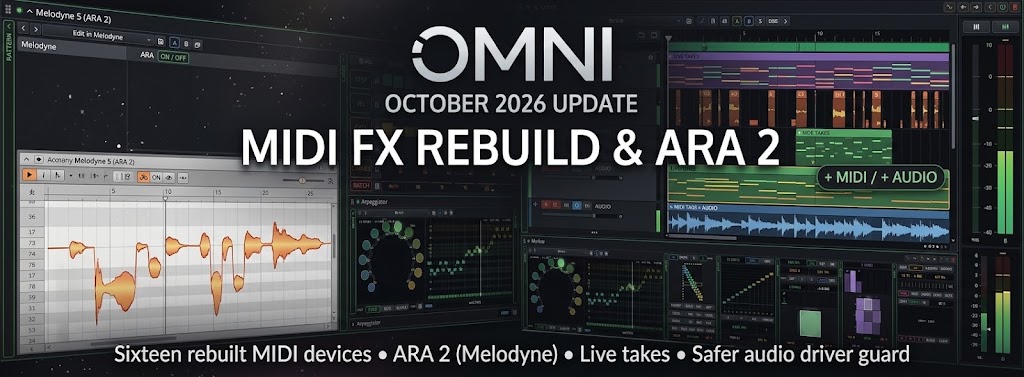
Build: e9c1034c | October 10 – 12, 2026
The last update rebuilt the effects and modulators. This one goes after everything that turns notes into music. Every MIDI effect in Omni now has a new engine, with the same rules that governed the previous release:
- Notes are pure functions. A note's pitch, velocity, length and timing depend only on song position, seed and settings. Seeking, looping, bouncing and changing the buffer size play exactly the same notes.
- What you see is what the engine plays. Each panel draws its notes, ghosts of upcoming events and curves with the same functions the engine calls, so the screen never lies about what comes next.
- Old projects sound the same. Every rebuilt device keeps its original parameter layout and upgrades older settings to values that reproduce the old notes, checked against reference tests that run the previous code.
🎛️ Sixteen MIDI Effects Rebuilt
Note Processing
- Velocity: a 74-parameter shaping stage with a PASS / CLIP / GATE input window, SCALE, OFFSET, FIXED, DRAW (8 nodes) and DYN (threshold, ratio, knee, makeup) curve modes, an output range and an invert switch. Groove tracks put accents on the song grid, key tracking and chord-aware top/bass rules, and a Human section with seeded random and drift. A histogram fit can match the curve to the velocities you actually play. 32 factory presets.
- Note Length: FIXED (1/64 to 4/1, with triplets and dotted values, or milliseconds), STRETCH, CLAMP, LEGATO mono and poly, RELEASE and GRID modes. Length can follow gate lanes on the song grid, velocity and key, with humanize and a shaping curve that is the same one the panel draws. 40 factory presets.
- Scale Quantize: a library of 92 scales in 11 families, including the modes of the major, melodic and harmonic minor and harmonic major. Key detection and a tonic progression track follow the song. Snap, White key and Degree mapping, plus tunings from Pythagorean and Werckmeister to Rast and Bayati and your own cents values. 50 factory presets.
- Chord: a Fixed mode with 51 shapes in families, and a Scale mode that builds chords on the scale degrees, from dyads to tredecimals. Voicing covers omit, inversions, drop 2 and 3, open voicing and spread, with voice leading that moves each note the least distance. Strum runs in seconds or beats with a curve and an accent on the top note. Chord names are recognised from the keys you hold.
- Arpeggiator: 18 note orders as pure functions, octave modes Up, Down, UpDown and Interleave, latch (Off, Hold, Add), and six polymetric lanes of 16 steps for pitch, velocity, gate, chance and ratchets. Plan steps can tie, skip or rest, and legato can run over 100 %.
- Note Echo: repeats in note values (straight, triplet or dotted) or milliseconds, with Ratio, Swing, Quantize to the song grid, a Feedback envelope, Floor, Echo, Repeat and Tail modes, and a Freeze. Echoes keep playing through loop wrap-arounds and while the transport is stopped. 42 factory presets.
- Random: a chance system on a 16-step lane, where each decision is a function of seed and position. Textures are White, Even (a golden-ratio sequence with no clumps or gaps) or Cluster, pitch can follow the scale, and a Turing-machine style Mutate keeps decisions alive across loops. Timing moves notes later or earlier while keeping their length. 42 factory presets.
Generators
These devices create notes from scratch. Each one is built on a pure function of the song, so a pattern can be seeked or bounced exactly.
- Marbles: three voices on the Marbles modulator core. The rhythm section has 7 models, Spread and Bias shape the pitch distribution, and Déjà Vu repeats loops in the real Mutable Instruments manner.
- Markov: three chains on a shared tick grid, for pitch (2 to 16 states, scale degrees or a held chord), rhythm (1 to 8 states with NOTE, REST and TIE) and dynamics. A 16×16 matrix is edited with live heat maps and statistics, and Learn builds the chains from the keys you play. 43 factory presets.
- L-System: a grammar rewritten over generations and read by a turtle, which turns it into melody. The alphabet, rules and axiom are editable, and the Garden panel draws the plant as it grows and plays. 42 factory presets in 7 families.
- Cellular: a cellular automaton used as a sequencer, in 1D (Wolfram rules 0 to 255) or 2D (Life-like and Generations). The keyboard places seeds, the readout window moves across the field, and each cell becomes a note in the scale. 42 factory presets.
- Thue-Morse: a sequencer driven by automatic sequences (Thue-Morse, Rudin-Shapiro, paperfolding, period doubling, ruler, Fibonacci word, Baum-Sweet and more), each term computed directly from its index. Four voices run as canons, with chance and velocity contours.
- Recamán: the spiral walk that steps back when the value is free and forward when it is not, plus its relatives (cyclic and prime-jump variants). The sequence is checked against OEIS A005132, and the Arcs panel draws every jump as a loop. 42 factory presets.
- Sequence: 16 classic integer sequences in 5 families (Collatz, recurrences such as Fibonacci and Padovan, number theory, self-similar and uniform), every one checked against OEIS. The tables for primes, divisor counts and the digits of π, e and √2 are precomputed, so the audio thread never builds them. 42 factory presets.
- Shepard: Shepard and Risset illusions, where a melody climbs or falls forever. Each event plays a stack of layers one octave apart, with an envelope that fades out at the edges, and a Risset rhythm that accelerates or decelerates without end. 42 factory presets.
- Walks: random walks across musical spaces. A walker moves up a scale or through a chord ladder with Drunk, Gauss, Lévy (a heavy-tailed jump) or Step laws, and a Tonnetz mode wanders through the 24 triads. Wind, Gravity and Edge forces are set per walker, and four voices can run as FREE, FOLLOW or MIRROR. 42 factory presets.
Modulation of Generators
Every generator's readouts are now real controls: right-click for Add Modulation, drag a modulator cable onto them, or MIDI Learn them. Whole-number settings such as Low, High, Octave, Transpose, voice Slow and Delay, and the Shepard and Walks parameters change in whole steps as they are modulated. Settings that rebuild a tape, grammar or field stay out of modulation, and a test confirms that modulating every parameter never allocates on the audio thread.
🔌 Plugins: ARA 2, Transport & Scanning
- ARA 2 (Melodyne): VST3 plugins that support ARA 2 now run inside Omni, including Melodyne 5. Clips on the track become ARA regions, edits made in Melodyne are rendered into exports and freezes, and the project saves its ARA archives next to it. Use Edit in Melodyne from the clip menu.
- ARA ON / OFF per slot: a switch in the plugin panel turns ARA off on a given slot, so the plugin runs as an ordinary VST3 with Transfer. The
noarapath selector does the same from the device picker. - Plugins know the loop: VST3 and VST2 receive the loop cycle, and plugins now get the real song position in samples. Before this, VST3 counted from the moment the plugin was loaded, so tempo-synced plugins drifted.
- Plugins that play with the transport stopped (for example Melodyne audition or synths that keep ringing) are now audible, because the output gate no longer swallows their sound.
- Plugin scanning: Kontakt 8 and Massive were blocklisted because their shutdown code crashed the scanner after it had finished. The scanner now exits right after reporting, and neither plugin is blocklisted anymore.
🎙️ Recording in the Arrangement
- Live takes: a take grows on the track while you record. You see its time, a waveform for audio, and notes for MIDI, with the held notes drawn in a lighter colour.
- FIT key: takes over a playing clip keep their full recorded length. Press FIT to cut the take to the loop, as before.
- Stop ends the recording: Stop on the transport, the spacebar and MIDI Learn now finish the take. Before, the recorder stayed armed and the next Play added to the old take.
- Record starts the transport: pressing Record with the transport stopped starts playback right away.
- MIDI takes on linear tracks: a MIDI take recorded on a track that plays from the arrangement lands as a linear clip from the start point to Stop, instead of being folded into a four-beat loop.
- Track headers: a MIDI track's header takes an instrument from the browser, and an audio track's header takes a sample (placed at the playhead). Dropping an instrument onto a track puts it there instead of creating a new track. + MIDI and + AUDIO sit under the last track.
🎹 Instruments & Panels
- Omni Synth: the Smart Random, Presets and Detach strip moved from the top bar into a collapsible PATCH column on the left. Every section folds into its own column, and the panel is much easier to scan.
- Smart Random no longer clicks. The UI used to send defaults first and then the level-matched values, which made a loud pop each time.
- Physical modelling panel: sections are laid out as vertical columns of knobs (up to four per column), and the panel is only as wide as it needs to be.
- Live MIDI import: importing a MIDI file into the piano roll keeps notes that carry a song position, and empty bars before the first note are trimmed.
🧭 Workflow & Interface
- Every device folds: FX, MIDI FX and modulators collapse to a narrow spine, just like the Omni Synth columns. Click the arrow in the device header to fold one.
- Modulator drawer: opens from the same key as the device header buttons, and the modulator column of an instrument is open by default. The + button for modulators works straight away.
- Device header buttons: remove, power, fold, the arrows and the modulator drawer are now small raised keys with a clear frame and hover state.
- Drag and drop: an FX or MIDI FX card stays in place while you drag it through the chain, dimmed, instead of disappearing under the placeholder.
🛡️ Audio Stability
- Audio driver guard: every audio device is opened through a guard. A journal on disk records each attempt before the driver is called, so if the driver kills the process, the next start notices, quarantines that device and starts on the system default with a banner that offers a retry or the settings.
- Watchdog: if opening takes more than 20 seconds or closing more than 15 seconds, the device is quarantined and Omni restarts itself in safe audio mode. An error returned by the driver falls back to the last working device, and your selection is never overwritten.
- Safe mode: start Omni with
--safe-audio, setOMNI_SAFE_AUDIO=1, or hold Shift at launch. - ASIO: ASIO4ALL switches off the input, and the device list refreshes each time Settings opens.
- Graphics fallback: if the GPU only offers a software adapter, the UI now tries another renderer rather than drawing on it.
- Quieter autosave: a failed autosave of an instrument that failed to load no longer spams the log hundreds of times a second.
Build e9c1034c is the same rule as the last release, applied to notes: if it's drawn on screen, it's what the engine plays, and if it played once, it plays the same way every time. Download the latest build from omnidaw.com and tell us which MIDI effect you reach for first! 🚀