Build: 25d00fc | April 23–28, 2026
🔵 Euclidean Pro — Phase 2: Morph, Boolean Logic and Elektron Conditions
Euclidean Pro has undergone a complete transformation in Phase 2. This is no longer just a "rhythm generator" — it's a fully-featured rhythmic composition environment.
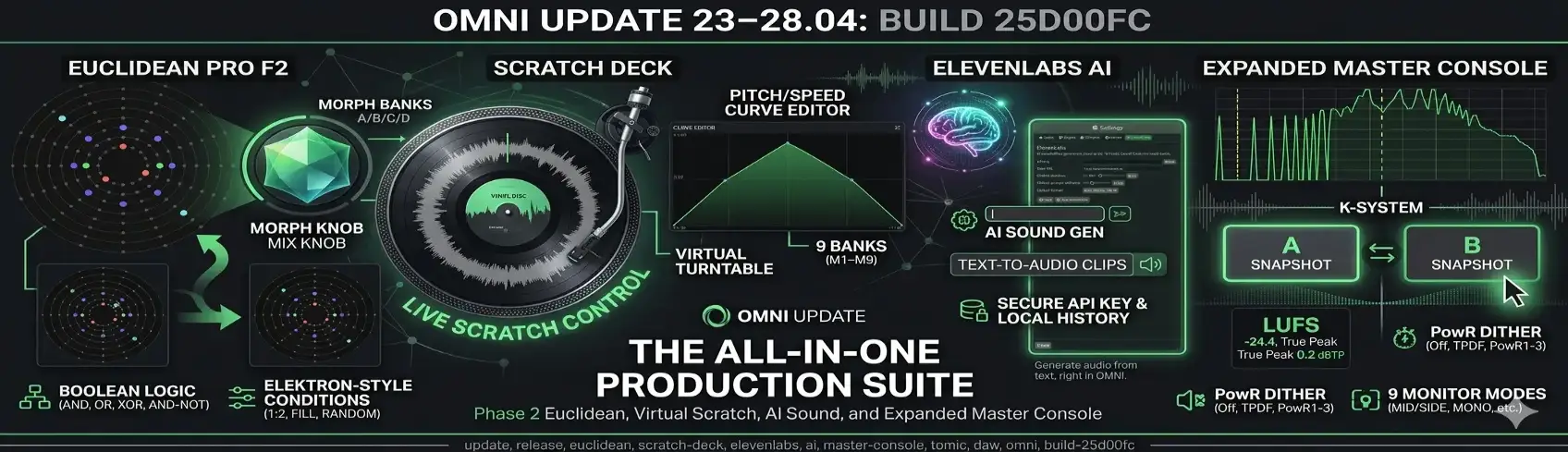
Morph Banks A/B/C/D + Mix Knob
- Four pattern banks (A/B/C/D) per channel — switch and morph between them in real time
- Morph Mix Knob — smooth transition between two banks; an LFO can modulate the morph position, creating organic rhythm evolution
- 24 factory presets using the Omni pitch map — ready-to-use patterns for instant results
Boolean Logic Between Channels
- AND / OR / XOR / AND-NOT operations between any rhythmic channels
- Example: kick AND-NOT hihat = kick hits only where there is no hi-hat → automatic "holes" without manual programming
- Real-time result, synchronized with the transport
Elektron-Style Step Conditions
- Each step can have a condition: 1:2 (every other time), 1:4, 2:3, FILL, NOT FILL, RANDOM…
- Patterns that never repeat — perfect for live breaks without looping
Other F2 Features
- Disk presets — save/load patterns to/from JSON files
- Mod Indicator — visual modulation activity indicator on each channel
- MIDI Channel per channel — each Euclidean channel sends MIDI on a separate channel
- Toolbar with audition — preview patterns without starting transport
- Velocity and probability lanes — per-step graphical editors
Phase 1 delivered RT-safety fixes: per-step LFO evaluation, pre-aggregated routing in the modulation matrix (O(slots+steps) instead of O(slots×steps×channels)), and a usize::MAX sentinel for the playhead when stopped.
🎧 Scratch Deck — Virtual Turntable
Scratch Deck is a new built-in instrument — a virtual turntable with a pitch/speed curve editor, scratching, and precise playback control.
- Curve editor — draw the speed/pitch curve by hand; 2-axis pan + zoom with the mouse wheel
- 9 slot banks (M1–M9) — save different curves to slots and switch during playback
- Trim strip — mark the sample's working region; the turntable respects the trim window
- Vinyl disc — the active sample is painted onto the disc; the needle tracks the playhead visually
- Jog feedback — turntable coupling with the speed curve
- Undo/redo for curve and knob edits
- State saving — curves, banks and parameters are saved in the project via
get_state/set_state(bincode); nothing is lost on reload - Curves exported to
.scratch JSON— portable between projects
🤖 ElevenLabs AI — Generate Sounds with AI
Omni integrates the ElevenLabs Sound Effects API directly into the interface:
- Describe a sound in text → AI generates the audio file → it lands automatically in a clip on the track
- Secure API key storage — saved to
~/.config/omni/elevenlabs_settings.jsonwithchmod 0600permissions; never enters the project file or audio engine - Local history — JSON manifest at
XDG_DATA_HOME/omni/elevenlabs_history/; atomic writes; browse previous generations - Test connection before use — key verification without downloading audio
- Blocking HTTP mode without tokio — zero overhead on the audio thread
🖥️ Expanded Master Console — New Mastering Panel
Omni gets a dedicated mastering panel — Expanded Master Console — opened with the M shortcut. It's a separate workspace for finalizing the mix, with a full view of masters, returns, and export tools.
Master Strip and Return Strips
- Dedicated strip for the master bus and each return bus with its own fader, EQ, and FX chain
- Equal faders across all buses — consistent proportions regardless of the number of returns
- Layout pinned to chrome height — the panel doesn't jump on window resize
A/B Snapshots
- Two independent mastering slots: A and B — switch with one click to compare two approaches to volume, EQ and compression
- The active slot tracks edits live — adding a compressor to slot A doesn't disappear after switching to B and back
- Standard behavior familiar from Pro Tools and Cubase
Monitor Modes with Visual Indicator
- 9 monitoring modes: Stereo, Mono, L-only, R-only, Swap L/R, Mid, Side, DIM, MUTE + polarity inversion
- Master meters always show the signal after the monitor mode is applied — you hear and see the same thing
- Mode chip in the top bar — phosphor icon lit green when any mode other than Stereo is active
Metering and K-System
- K-System line on meters — K-12/14/20 visual reference always visible
- Peak, RMS and Pearson correlation in real time; LUFS and True Peak for export
Advanced PowR Dither
- Five algorithms: Off / TPDF / PowR1 / PowR2 / PowR3
- PowR uses hand-tuned noise-shaping curves (1/3/5-tap weighted FIR) — higher quality than plain TPDF for 16/24-bit conversion
- Dither active only when exporting to Wav16 and Wav24 — automatically disabled for Float32 output
- Algorithm and flag saved in the project
Bounce and Sequenced FX
- Bounce → Export button directly in the Master Console
- Sequenced FX available in the master and return chains — rhythmic effects on buses without workarounds
🎙️ TOMiC Recording — Deep Polyrhythm Fix
Several serious bugs in TOMiC recording and playback have been eliminated:
- Phantom kick in arrangement — double-triggering of beat-0 on every loop iteration. Cause: the buffer right after crossing the loop boundary satisfied a false "overshoot" condition, firing beat-0 a second time. Fix: tracking
prev_buffer_end— recovery only activates on a real transport discontinuity (seek, loop wrap), not on continuous forward playback - Full TOMiC polyrhythm recorded — the recorder was using the default clip length (4 beats) instead of the actual pattern length (e.g. kick 32×1/32 = 8 beats). Effect: notes from beats 4–8 were discarded on every wrap. Fix: dynamic calculation of
longest_channel_beats()from per-channel pattern data - Monotonically growing record cursor — MIDI timestamps were based on
pos_counter(which resets on session loop), so events from subsequent iterations collided with the first. The newrecord_cursor_samplesnever moves backward - Duplicate notes on repeated playback — notes whose end extended beyond the loop boundary caused
clip.lengthto inflate to a multiple, generatingloop_count = 2and double-triggering. Fix: clamp duration to the segment boundary + constant clip length =loop_len_samples
🎲 Randomizer with Braids Algorithms
The built-in melody randomizer integrates algorithms from the Braids engine (Mutable Instruments):
- A dozen generative algorithms: FM, chord, wavetable, noise…
- Waveform preview — see the waveshape before accepting the randomization
- Works with the active scale and calibrated pitch map
📦 Session and Arrangement — UX
- System drag-and-drop to arrangement — drag an audio/MIDI file from the file manager directly onto the timeline
- Queued clip sync — a queued clip syncs to the longest currently playing clip (not the global clock)
- Clip arming preserved after transport stop
- Double-click on an audio clip opens the Sample Editor (not Piano Roll)
- Unified Add FX menu on tracks, returns and master — the same list everywhere
- Step Sequencer: auto-randomize with interval/offset — randomize every N-th step; shift L/R rotates the mute array together with the steps
🔧 OmniScript — 15 New Examples
15 new OmniScript plugins join the examples/scripts/ folder:
- Modulators, MIDI FX and Audio FX — complete examples ready to use as a starting point
- Documentation in
docs/OMNISCRIPT.mdupdated with the new API
Omni is actively developed — the next update is coming soon. 🚀
With this update, the pre-alpha phase is officially complete, and the project is now entering the alpha phase.
Scratch Deck or Euclidean Pro Morph — which one lands in your project first? Let us know.