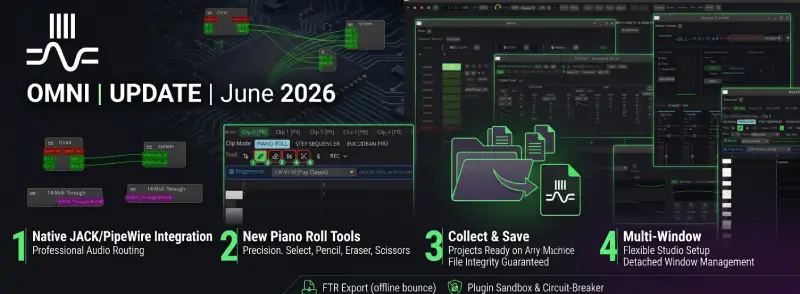
Build: ebd2732 | June 1 – 23, 2026
🎚️ JACK/PipeWire — Omni as a native client for professional Linux audio
For producers working on Linux, JACK and PipeWire are not an option — they are the standard. External synthesizers, controllers, hardware in the loop, synchronization with other DAWs, sub-millisecond latency — all this works only when your DAW speaks the JACK language. Omni speaks it now.
The integration was built in six architectural phases — the audio engine was rewritten around a backend abstraction that treats JACK and PipeWire exactly the same as CPAL. There are no shortcuts or shim layers.
- Audio input and output — stereo ports
in_L/in_Randout_L/out_Rregistered on startup, auto-connect tosystem:captureandsystem:playback. Latency identical to a direct hardware connection — JACK manages the buffers, not Omni. - MIDI over JACK ports — any MIDI track can send to any JACK port (hardware synth, Carla, another DAW) or receive from a controller connected via JACK. No middleman, no conversion.
- Transport sync — Omni as master — once activated, Omni takes control over the JACK transport: position in bars/beats, BPM, and seek are immediately visible to all applications listening to JACK (Ardour, Hydrogen, SuperCollider, hardware samplers). Optionally, Omni can also listen to an external master.
- Server parameters — sample rate and buffer size are read directly from the JACK server at startup; Omni doesn't impose its own values, it adapts to the session.
- PipeWire works identically — PipeWire's JACK-compatible layer is handled by the same backend; no separate configuration is needed.
- UI in settings — backend selection (CPAL / JACK / PipeWire), toggle auto-connect, connection status with port count, display of active SR and buffer size.
Practical effect: you connect a hardware synth via JACK, draw a MIDI track in Omni, hear the synth's output in Omni's mixer, and record it onto an audio track. Sub-10 ms latency without any workarounds.
🎹 Piano Roll — four dedicated tools
The previous piano roll had one "default mode" combining several intentions — a click could create a note or select it, depending on the context. In practice, this led to errors and slowed down the workflow. Now, each tool does one thing and does it well.
Select (key 1)
Selecting, moving, changing length, and duplicating notes:
- Click on a note — exclusive selection; Shift+click — add to selection; drag in an empty space — marquee selection.
- Dragging a selected set — moves the entire selection; note edges have
[ ]handles to change length from both sides. - Alt+drag — duplicate selection and move the copy; Delete / Backspace — remove selected notes.
- Double-click on an empty area — creates a new note (without changing the tool).
- Ctrl+A — select all; Ctrl+D — duplicate; arrow keys — nudge pitch/time by one grid step.
Pencil (key 2)
Drawing notes without taking your hand off the mouse:
- Draw-to-size: click sets the start point, dragging to the right stretches the note's length — you see it grow under the cursor. Releasing the mouse commits it.
- Sweep-paint: if you drag to a different pitch while drawing, the Pencil creates another note at the new pitch — quick melody line painting without lifting the mouse button.
- Vertical hysteresis prevents accidental pitch changes while setting the horizontal length — the note sticks to its pitch until the cursor clearly moves to another row.
- When chord mode is active — Pencil draws a full chord with a single click.
Eraser (key 3)
Deleting without selecting and confirming:
- Click on a note — instant deletion; drag — paint-erase, deletes all notes touched by the cursor in a single motion.
- Does nothing on an empty space — safe dragging through a note-free area.
- The entire mouse gesture is a single undo step — Ctrl+Z undoes the whole "stroke", not each individual note.
Scissors (key 4)
Cutting and chopping notes anywhere:
- Click on the note body — splits at the cursor position; both halves retain the original's velocity and all parameters, touching without a gap.
- Chop (in the toolbar when Scissors is active) — cuts selected notes into N equal parts or into melodic patterns: Equal, Random Melody (with density and style controls), Progression (based on a selected chord progression). The "Chop" button is active only when something is selected.
Keyboard shortcuts: 1 / 2 / 3 / 4 switch tools. The active tool is highlighted in the toolbar; the cursor changes to the corresponding Phosphor glyph.
💾 Collect & Save — a moved project is a ready project
The classic DAW problem: the project cannot be opened on another machine because audio files are arranged differently on the disk, reverb IRs have absolute paths, multisample zones point to a directory that doesn't exist on the new computer. Collect & Save eliminates this problem with one click.
- What gets collected — all audio clips from the arrangement and session, all multisample zones (previously skipped, leading to data loss after moving), Convolution Reverb IR files, A/B reference track, ScratchDeck samples.
- How it works — upon saving, Omni copies every dependency file to the
projekt_audio/subfolder and changes paths in the project to relative ones. Original files are not touched. - Name collisions handled automatically: two files with the same name are saved as
loop.wavandloop_1.wav. - After moving — you open the folder on any machine, Omni resolves relative paths; there are no "file not found" errors.
- Use case: finished project → archival on an external drive, sending to a mastering engineer, handing off to a collaborator, backing up to a git repository. One press of Save does it all.
🪟 Multi-Window — every panel in its own window
Omni now allows you to detach any main panel to a separate OS window. Browser, Mixer, Arrangement, Piano Roll, Master Console — each can live on its own monitor.
- ⧉ icon in the panel header — clicking it moves the panel to a separate window; clicking the X in that window pins it back to the main interface.
- Layout remembered — the window size, position, and detached state are saved in user settings and restored on the next startup (optional).
- Zoom works in every window — Ctrl+/Ctrl−/Ctrl+0 scale the content independently in each detached panel.
- Typical studio setup: Arrangement + Mixer on the first monitor, full-screen Piano Roll on the second. No Alt+Tabbing between views.
🔒 Plugin Scanning Sandbox — the scanner doesn't crash the DAW
Scanning VST/CLAP directories for new plugins is a risky moment: a poorly written or malicious plugin can crash the application while loading metadata. Omni now isolates the entire scanning process in a separate child process.
- Plugin crash during scan — the scanner process dies, the DAW runs uninterrupted.
- A crashing plugin is automatically added to the blocklist; it is skipped during the next scan.
- Each plugin has a status: Safe / Trusted / Blocklisted / Unknown — visible in the browser. Manual unblocking from the UI for plugins that received a developer update.
- Validation upon project load — a blocklisted plugin is not instantiated automatically, the DAW prompts the user.
⚡ FTR Export — 5 minutes of music, less than a minute of rendering
Offline bounce: the engine processes the session bypassing the audio buffer and real-time constraints. It doesn't play back the project — it renders it in a computation loop as fast as the CPU allows.
- Speed — 2–8× faster than real-time, depending on DSP complexity. Simple mixing is ~8×, a heavy project with convolution reverb and granular synth is ~2–3×.
- Zero glitches — no audio buffer, no system interruptions, no underruns. Offline render is deterministic — the same input yields the same output, bit for bit.
- Available in the Export Dialog alongside standard Bounce; both options coexist.
- Ideal for: final mastering after finishing work, rendering stems, batch exporting multiple projects.
🛡️ Soft Circuit-Breaker — the plugin hangs, the engine keeps playing
In-process plugins (CLAP, VST3 without sandbox) run in the same audio thread as Omni. If a plugin enters an infinite loop or processes very slowly, the audio callback blocks. The new circuit-breaker mitigates the damage.
- The audio thread timestamps the entry into
plugin.process(). A global watchdog polls every 25 ms. - If the plugin hasn't returned after 100 ms — it is marked as
STALLED; subsequent buffers bypass itsprocess()and pass audio straight through. - A banner appears in the FX chain: "Plugin stalled — Resume". Clicking it restores processing and reinitializes the plugin's state.
- Limitation: the first hang blocks the current buffer (Rust cannot safely interrupt a native thread). The breaker protects every subsequent buffer and eliminates issues with slow or intermittently hanging plugins. Full isolation (including the first hang and crash) is available via the process sandbox for VST3.
🏗️ Omni now has real CI/CD
A change less visible to the end-user, but fundamental to code quality: Omni now has a full GitHub Actions pipeline triggered automatically on every commit.
- Formatting → dependency audit → clippy → tests → benchmarks → build — no PR can pass with compiler warnings, test failures, or performance regressions.
- Comparative benchmarks — every PR gets a report: how much faster or slower than main? Regressions are visible before merging.
- AppImage for Linux built automatically — Docker + ubuntu:18.04 guarantees backwards glibc compatibility; a ready-to-download file on every build.
- cargo deny — every dependency is checked for known CVEs and licenses.
What this means for the user: more stable builds, fewer regressions, shorter time from bug discovery to fix.
🐛 Other fixes
- Warp modes — mode (Auto / Beats / Tones / Texture / Complex) selected based on setting, not trigger; changing mode mid-session works without resetting playback.
- Fade Curve Selector — Linear, Exponential, S-Curve available per-clip from a single UI location; math fade in
omni_sharedis the single source of truth used by the engine and UI. - 817/817 engine tests passing
Three weeks of intense sprinting. Omni is reaching the point where serious end-to-end music production — hardware, recording, editing, mixing, export — happens entirely within one application, without stepping outside. 🚀
JACK integration, Piano Roll tools, Collect & Save — which of these three changes your workflow the most? Let us know.